
Look, choosing the right digital menu board software for your restaurant isn’t just another checkbox on your operations list, it’s actually one of those decisions that can seriously impact your daily workflow, how customers experience your brand, and whether you’re making money or watching it disappear on software that doesn’t pull its weight.
Two names keep popping up when restaurant owners start shopping around: DotSignage and ScreenCloud, and honestly, both have their fans.
But after diving deep into the features, comparing what you get for your money, reading through tons of real user reviews, and looking at what actually matters for restaurants specifically (not just generic businesses), we’re breaking down which one really delivers for American restaurant operators.
Key Factors to Consider When Evaluating Digital Signage Software

Before we dive deeper into the comparison, let’s talk about what actually matters when you’re choosing digital menu boards software for your restaurant.
Too many operators make the mistake of getting dazzled by fancy features they’ll never use or falling for the cheapest option without considering total cost of ownership, so here’s a practical framework for evaluating any digital signage platform based on what actually impacts your daily operations and bottom line.
1. Industry-Specific Features vs. Generic Tools

Why it matters: A platform built for restaurants understands menu layouts, pricing displays, combo meals, and food photography, while generic platforms force you to hack together solutions that were designed for corporate offices or retail stores.
What to look for: Pre-built digital menu board templates designed for food service, easy price update workflows, nutritional information fields, dayparting capabilities for breakfast/lunch/dinner, and image libraries with actual food photography instead of generic stock photos.
2. True Cost of Ownership (Not Just Monthly Price)
Why it matters: That $15/month platform might seem cheaper until you factor in setup fees, feature upgrades, training costs, IT support hours, and hidden charges for basic functionality that should be included.
What to look for: All-in pricing with no surprise fees, transparent upgrade paths, free training and onboarding, included technical support, and clear policies on what happens if you add/remove screens.
3. Update Speed and Workflow Efficiency
Why it matters: Restaurant menus change constantly, sold-out items, price adjustments, seasonal specials, daily promotions and you need software that lets you make changes in seconds, not minutes or hours.
What to look for: Single-click publishing across all locations, real-time sync that happens in seconds not minutes, and intuitive interfaces that don’t require training every time you need to change a price.
4. Multi-Location Management Capabilities

Why it matters: If you’re operating more than one location (or planning to expand), managing menu boards individually at each site is a nightmare that wastes hours and creates inconsistency across your brand.
What to look for: Centralized dashboard with bird’s-eye view of all locations, ability to push updates to specific locations or entire groups, location-specific pricing and menu variations, and real-time deployment without USB drives or manual work.
5. Setup Complexity and Learning Curve
Why it matters: Your restaurant managers are busy running operations, not becoming software experts, and every hour spent learning complicated platforms is an hour not spent serving customers or training staff.
What to look for: Setup time under 15 minutes per screen, intuitive interface that makes sense immediately, pre-configured templates that work out of the box, minimal technical requirements, and the ability for non-technical staff to make updates confidently.
6. Support Quality and Availability
Why it matters: When your menu boards go down during lunch rush or you need urgent help with a menu change, you can’t wait 24-48 hours for an email response or be told that phone support is only available during business hours.
What to look for: 24/7 availability (restaurants don’t close at 5 PM), multiple contact methods (phone, email, chat), fast response times with actual humans, free onboarding assistance, and proactive account management for larger deployments.
7. Hardware Flexibility and Futureproofing
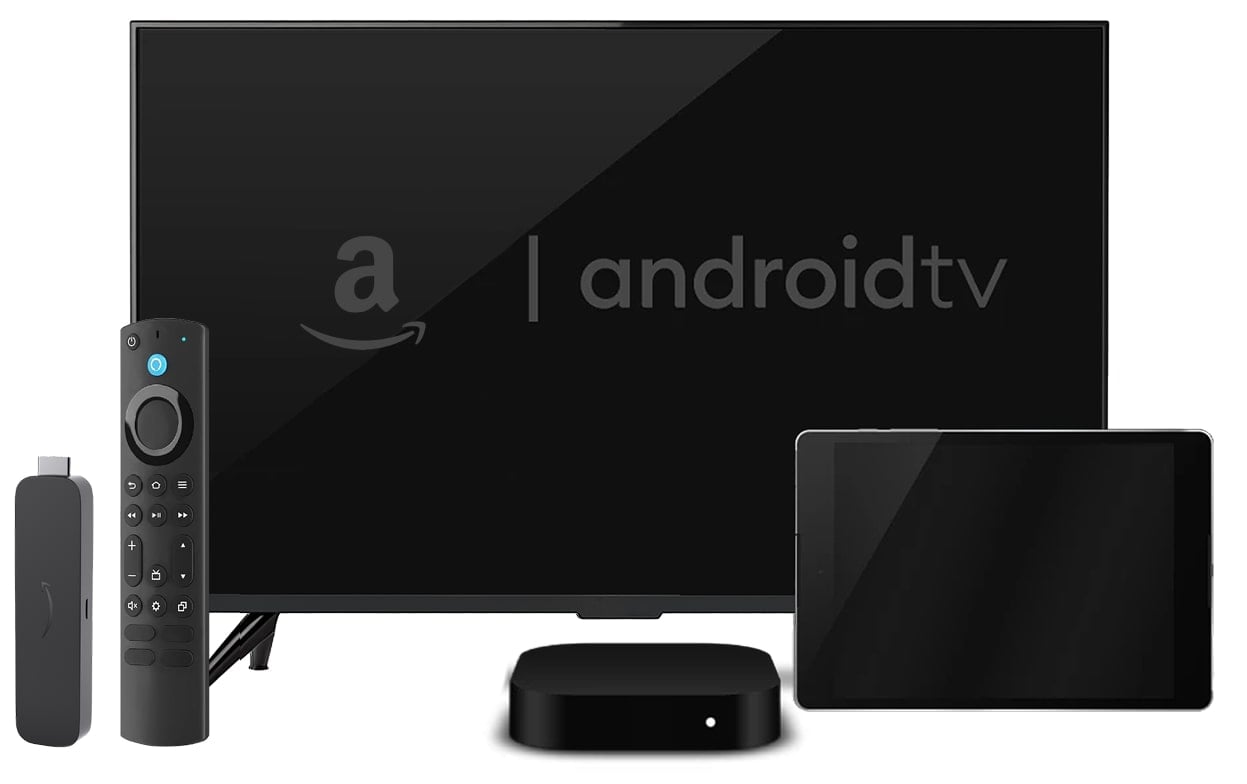
Why it matters: Getting locked into proprietary hardware means you’re at the mercy of one vendor’s pricing and upgrade cycles, while platform flexibility lets you use cost-effective devices and upgrade on your own timeline.
What to look for: Compatibility with common devices (Amazon Signage Stick, Android TV, Fire Stick, Chromecast), no proprietary hardware requirements, works with displays you already own, easy hardware replacement without vendor lock-in, and future compatibility with newer devices.
8. Proven ROI and Real-World Results
Why it matters: Digital menu boards are an investment, and you need confidence that the platform actually delivers measurable results like increased sales, higher average tickets, and faster customer decision-making, not just pretty screens.
What to look for: Case studies from actual restaurants, specific metrics on sales increases, customer testimonials with numbers, documented improvements in order time or ticket size, and transparent reporting on what customers achieved.
Bottom line: The best digital signage software for restaurants isn’t the one with the most features or the flashiest interface, it’s the platform that’s purpose-built for food service operations, delivers measurable ROI, saves you time instead of wasting it, and costs less while doing more.
Let's Talk Money Because Your Budget Actually Matters
Here’s the thing about restaurant margins, they’re already razor-thin, which means every dollar you spend on software needs to work harder than your best line to cook during dinner rush.
What You'll Pay for DotSignage:
DotSignage comes in at $10 per screen monthly if you commit to an annual plan (which honestly makes sense if you’re serious about digital menus), or $12 per screen if you prefer the flexibility of going month-to-month. Checkout our pricing
The beautiful part is that what you see is what you get, no sneaky fees hiding in the fine print, no “oh by the way, that feature costs extra” surprises, and they throw in volume discounts once you hit 30+ screens, which is perfect for growing chains.
What ScreenCloud Will Cost You:
ScreenCloud’s Core plan starts at $20 per screen monthly when you pay annually, their Pro plan jumps to $30 per screen, and if you’re running 25 or more screens they want you on an Enterprise plan with custom pricing.
Let's Do Some Real Math That Matters:

Picture a typical quick-service restaurant chain with 5 locations where each spot has 3 screens, that’s 15 screens total that need to be managed and updated regularly.
With DotSignage, you’re looking at $1,800 annually, whereas ScreenCloud will run you $3,600 on annual plan for the same setup.
That’s a straight-up $1,800 and more of an annual difference that could instead go toward staff training, launching that new marketing campaign you’ve been putting off, or developing new menu items that customers will love.
Now scale that up to a 50-location chain each store having at least 3 screens (which isn’t unusual for successful QSR brands), and suddenly that difference becomes a minimum of $18000 per year, real money that impacts your bottom line and could be used for a lot of other things to grow the chain business.
Restaurant-Specific Features: Built for Food Service vs. Generic Digital Signage
Here’s where things get interesting because not all digital signage is created equal, and the difference between a platform built specifically for restaurants versus one that tries to serve every industry becomes painfully obvious once you start using it day-to-day.
DotSignage: Purpose-Built for Restaurants Who Need To Move Fast
DotSignage was designed specifically with restaurant operators in mind, and you can tell the moment you start using it because everything just makes sense for how restaurants actually work.
750+ Restaurant-Specific Templates That Actually Look Good:

Unlike generic digital signage solutions that give you a handful of boring templates and say “good luck,” DotSignage offers a massive library of professionally designed menu boards templates specifically created for quick-service restaurants, fast-casual dining spots, coffee shops that need to showcase 47 different drink options, pizza restaurants with complex topping combinations, burger chains with customizable meals, food trucks operating in tight spaces, and drive-thru menu boards that need to communicate clearly at a glance.
These aren’t just generic templates with pictures of food slapped on them, they’re designed with actual food service best practices in mind, featuring optimal layouts for menu items that make sense to hungry customers, pricing that’s easy to read from across the restaurant, combo deals that drive higher ticket averages, and promotional content that actually converts browsers into buyers.
A Menu Board Editor That Speaks Restaurant:
The drag-and-drop menu board editor is specifically built for restaurant needs, which means you’re not fighting with the software trying to make it do what you need, it already does it.
You get a pre-loaded food images library so you’re not scrambling to find decent photos of your signature burger, easy price updates that take seconds instead of minutes (critical for restaurants dealing with fluctuating food costs and supplier price changes), calorie information fields that keep you FDA compliant without extra work, combo meal layouts that make sense visually, size variation displays for small/medium/large options, and category organization that mirrors how customers actually think about food.
Dayparting Made So Simple Your Morning Manager Can Handle It
Restaurants don’t serve the same menu all day (unless you’re a 24-hour diner, in which case, respect), so you need software that automatically switches between breakfast, lunch, and dinner without someone having to remember to manually change screens.
- Breakfast menu displayed from 6:00 AM – 11:00 AM
- Lunch specials shown from 11:00 AM – 3:00 PM
- Dinner menu runs from 3:00 PM until close
- Happy hour promotions highlighted during the peak 4:00 PM – 7:00 PM window
- Late-night menus activated for post-bar crowds after midnight
ScreenCloud: All-purpose digital signage software solution
ScreenCloud positions itself as an all-purpose digital signage solution that works for retail stores, corporate offices, schools, healthcare facilities, and yeah, restaurants too, which sounds great in theory until you realize that trying to be everything to everyone usually means you’re not particularly excellent at any one thing.
150+ Generic Templates Across All Industries:
ScreenCloud offers approximately 150 templates total, but here’s the catch, those templates are spread across every industry they serve, which means the actual restaurant-specific options are pretty limited.
Many users report needing to do extensive customization just to get their menu boards looking decent, dealing with template limitations that don’t account for how food service actually works, and spending way more time than they expected just getting basic menu boards up and running.
General Content Management That Works But Isn't Optimized:
While ScreenCloud genuinely excels at displaying corporate communications, business dashboards, and general content (which is great if you’re running a tech company with data visualizations), restaurant operators consistently report a steeper learning curve for menu board creation, less intuitive workflows for the rapid price changes that restaurants need to make regularly, and the lack of a dedicated menu board editor that understands food service needs.
Menu Update Speed: When Every Second Counts During Operations
Here’s a reality check for anyone running a restaurant, you need to update menu prices, swap out sold-out items, and push promotional content in real-time, not after a 20-minute battle with complicated software while customers are literally standing at your counter waiting to order.
The difference between platforms becomes crystal clear when you’re in the middle of lunch rush and realize your chicken sandwich special sold out, or when your supplier calls at 10 AM saying beef prices jumped overnight and you need to adjust pricing immediately before the dinner crowd arrives.
DotSignage: Update Menus in Under 60 Seconds
DotSignage was built for the reality of restaurant operations where speed matters more than fancy features, and the workflow reflects this with a streamlined process that any manager can handle from their phone or computer without technical training.
Open the app on your phone while you’re literally on the restaurant floor, navigate to the specific item that needs changing, tap to edit the price or mark it as “sold out,” hit publish, and watch the change appear on all your screens within 10-15 seconds, that’s it, you’re done and back to running your business.
Managers consistently report making menu updates during their morning coffee before rush starts, between lunch and dinner service without disrupting operations, and even from home when suppliers call with last-minute price changes that need immediate attention.
Setup & Ease of Use: Time Is Literally Money In This Business
Restaurant managers and owners don’t have hours to spend wrestling with complicated software configurations, reading through technical manuals, or waiting on hold with support just to get basic menu boards running.
DotSignage: 5 Minutes Per Screen and You're Done
Setting up DotSignage is genuinely as simple as downloading the app on any Android TV or Amazon Fire Stick (which costs like $30-40 and you probably already have) or a much better option of Amazon Signage Stick (that auto-boots and allows effortless control over screens remotely) , entering a pairing code that the system gives you, selecting your pre-designed menu template from their massive library, customizing your prices and menu items with their intuitive editor, and hitting publish to see it go live instantly.
Most restaurant managers can handle the entire setup without ever needing to call IT support or technical help, which is exactly how it should be.
Multi-Location Management: Scale Without The Chaos
For restaurant chains and franchise operations, the ability to manage multiple locations efficiently isn’t just convenient, it’s critical to maintaining brand consistency, pushing updates quickly, and not losing your mind trying to coordinate menu changes across dozens of locations.
DotSignage Multi-Location Features That Actually Work
Centralized Control That Makes Life Easier:
DotSignage lets you update all your locations from a single dashboard that gives you a bird’s-eye view of everything, push menu changes to specific locations or blast them to entire groups with one click, skip the whole ridiculous process of burning USBs and having managers manually update screens (yes, some restaurants still do this), and deploy updates in real-time so changes appear across your entire chain within seconds instead of days.
Franchise-Friendly Features For Complex Operations:
The platform handles location-specific pricing (because a burger in Manhattan costs more than one in rural Nebraska), regional menu variations that reflect local tastes and ingredient availability, group management for different regions or franchise owners, and bulk updates with location exceptions so you can change everything except those three stores that are testing new items.
The Old Way vs. The DotSignage Way:
The traditional method is painful: email updated menu files to your franchisees, wait for them to actually check their email and download the files, have them transfer everything to a USB drive, require them to physically drive to the restaurant location, make them upload the new content to each screen manually, and then repeat this entire circus for every single location you operate.
With DotSignage, you make your change in the dashboard, click publish, and watch all your screens update in seconds while you move on to actually important work. It’s honestly that simple and it saves hours of coordination headaches.
Customer Support: When Things Break and You Need Help Now
Restaurant operations don’t stop for technical difficulties, which means when your menu boards go down or you need help making changes, you need support that’s actually there and actually helpful instead of pointing you to a help article that doesn’t answer your question.
DotSignage Support That Shows Up:
DotSignage offers 24/7 technical support (because restaurants operate around the clock), an average response time of 30 minutes which is genuinely impressive for a software company, dedicated account managers to each account even if you are not enterprise so you’re not just ticket number 4,729, support via phone, email, and chat so you can reach them however works best for you, free onboarding assistance to get you started right, and even a menu design service for $60 per template if you want something custom but don’t have design skills.
Real-World Performance: What Restaurant Owners Actually Report
Numbers don’t lie, and when actual restaurant operators share their results after implementing digital menu boards, it tells you everything you need to know about whether a platform actually delivers or just makes promises.
DotSignage Customer Results That Move The Needle
Based on a comprehensive survey of 75 actual DotSignage restaurant clients across different concepts and locations, the results are impressive:
91% reported sales increases of 8-10% after implementing digital menu boards (which is huge considering how competitive the restaurant industry is),
- Average check size increased by 6% due to dynamic menu boards driving better upsells
- Table turnover rate increased by 15.3% as customers made faster decisions with clear visual menus
- Margin per order improved by 3.2% through better promotion of high-margin items
- Customer retention increased by 1.8%, creating long-term compounding value
- Promoted items saw a 3.8% increase in orders, proving strategic item highlighting works
Integration Capabilities: Connecting To Your Existing Tools
Modern restaurant operations involve multiple systems and tools, so being able to integrate your digital menu boards with other software you’re already using can streamline workflows and save time.
DotSignage Integration Essentials:
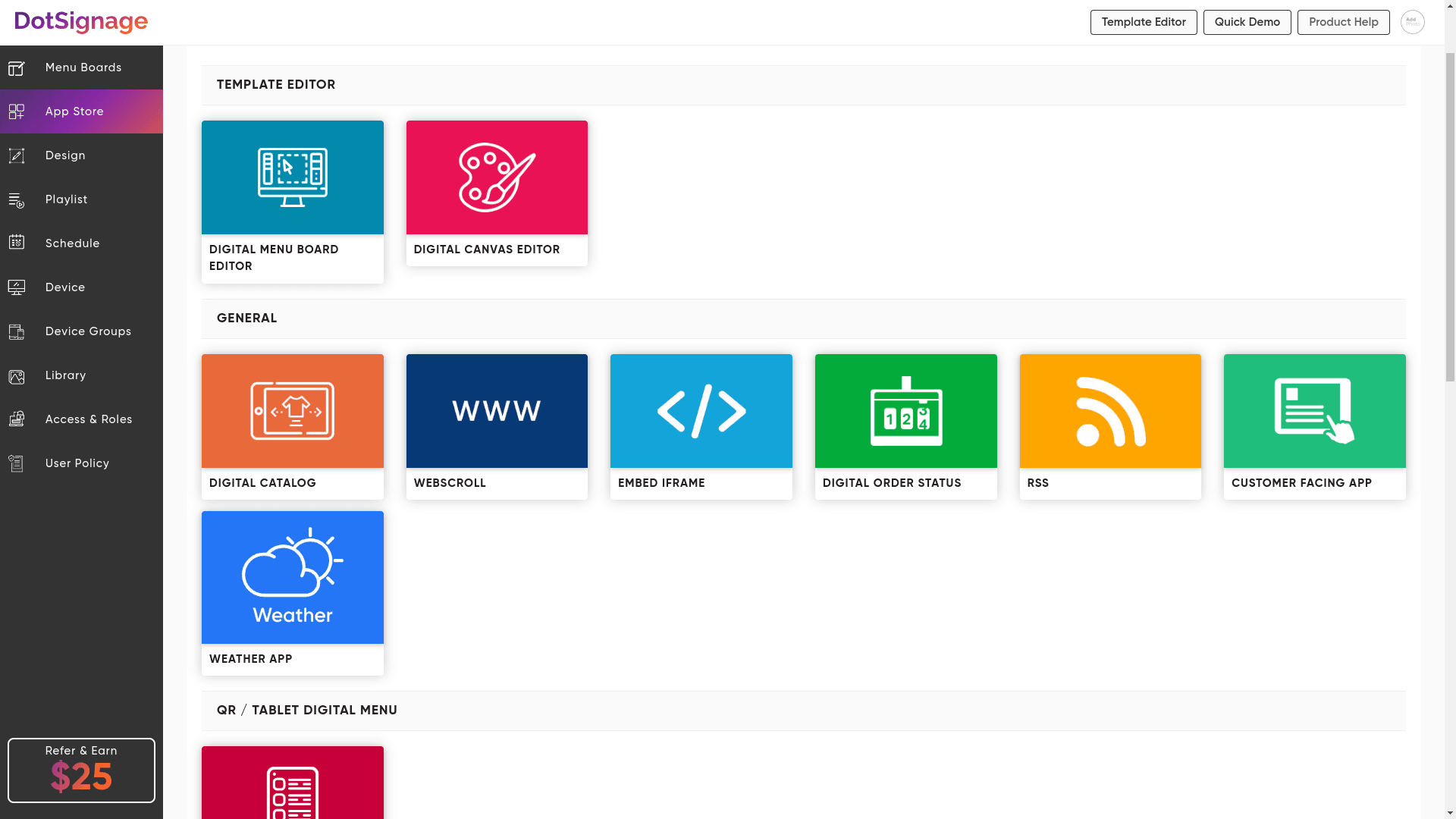
DotSignage includes 30+ built-in apps and integrations that cover what restaurants actually need: Google Slides for presentations, Google Drive for content storage, weather feeds so you can display local conditions, news feeds if you want to show current events, HTML content support for custom displays, and video playback supporting MP4, MPEG, AVI, WMV, and basically every format you’d reasonably use.
ScreenCloud Integration Library:
ScreenCloud offers 70-80+ apps and integrations which is legitimately impressive, they’ve got Google Slides, all the social media platforms, Power BI, TripAdvisor, and tons of other business tools that make sense if you’re running corporate dashboards or retail operations with complex data needs.
The Real Winner
ScreenCloud definitely has more integrations overall, but here's the honest truth, DotSignage includes all the essential integrations that restaurants actually need and use regularly, while ScreenCloud's extra integrations are mostly valuable for corporate environments rather than food service operations.
The Verdict: Which Platform Actually Wins For US Restaurants?
Let’s break down the scoring across every category that actually matters to restaurant operators who need results, not just features that look good in marketing materials.
Pricing: DotSignage Wins By A Landslide
At literally half the cost of ScreenCloud’s comparable plans, DotSignage delivers exceptional value that directly impacts your bottom line, and for restaurants operating on margins that are already tight, this 50% savings is genuinely significant money that compounds over time as you scale.
Restaurant-Specific Features: DotSignage Wins Decisively
With 750+ purpose-built templates versus ScreenCloud’s generic approach, a dedicated menu board editor that understands food service, and FDA compliance readiness baked right in, DotSignage is clearly the winner for actual food service operations that need tools built for their specific needs.
Ease of Use: DotSignage Wins On Practicality
The 5-10 minute setup time, intuitive interface that doesn’t require technical knowledge, and restaurant-specific workflows that mirror how you actually operate mean faster deployment, less training time, and managers who can handle updates without calling IT support.
Multi-Location Management: DotSignage Wins For Growing Chains
Purpose-built features for franchise operations, location-specific controls that handle regional variations, bulk update capabilities that save hours of coordination work, and real-time deployment across entire chains make DotSignage the obvious choice for restaurants with multiple locations.
Customer Support: DotSignage Wins On Responsiveness
The 24/7 support availability with 30-minute average response times versus ScreenCloud’s 24/5 support gives DotSignage a real edge, especially for restaurants operating outside traditional business hours when technical issues don’t care what day of the week it is.
Integration Capabilities: ScreenCloud Wins On Quantity
ScreenCloud objectively offers more third-party integrations with enterprise business tools and data visualization platforms, though most restaurants won’t actually need or use the majority of these additional integrations in their day-to-day operations.
Overall Winner for US Restaurants: DotSignage Takes It
When you add up everything that actually matters for restaurant operations, cost savings, purpose-built features, ease of use, multi-location management, responsive support, and compliance readiness, DotSignage is clearly the better choice for American restaurants that need digital menu boards that actually drive results.
Who Should Actually Choose ScreenCloud?
Screencloud works well if you need advanced dashboards and data visualization beyond simple menu boards. It’s also a strong option if you rely on complex integrations with enterprise tools.
If your digital signage supports corporate communications across multiple departments, ScreenCloud can be a good fit. It’s also suitable if you have a large IT team that can manage a more complex setup and ongoing maintenance.
And if you need to display real-time data from business intelligence tools, ScreenCloud offers stronger integrations for that.
Who Should Choose DotSignage Without Question?
DotSignage is the clear winner for food businesses. It’s ideal for restaurants, quick-service restaurants, cafes, and similar setups where menu boards are the main use case.
It helps you maximise the ROI of digital menu boards with lower monthly costs, freeing up budget for other priorities.
Setup is fast and simple. No technical skills or IT team needed. It works well for multi-location businesses and franchises that need consistent branding.
It also offers restaurant-specific templates and features, not generic tools. Updating prices is easy when ingredient costs change.
Most importantly, it’s perfect if you value simplicity and ease of use over features you may never need.
Real Cost of Ownership Comparison: The Numbers That Matter
Let’s look at a realistic scenario for a growing restaurant chain that’s expanding and needs reliable digital menu boards that won’t break the budget or require constant maintenance.
Same Scenario: 5 locations with 3 screens per location totaling 15 screens that need coordinated management and regular updates.
Year 1 Total Costs:
DotSignage:
- Software subscription:
$120 per screen (Annual Plan) × 15 = $1800 annually
$12 per screen (Monthly Plan) × 12 months × 15 = $2160 annually - Setup time investment: Minimal because managers can handle it themselves
- Training costs: Included in the subscription with free onboarding
Total Minimum Year 1 Investment: Between $1800 – $2200
ScreenCloud:
- Software subscription:
$240 per screen (Annual Plan) × 15 = $3600 annually
$24 per screen (Monthly Plan) × 12 months × 15 = $4320 annually - Setup time investment: May require IT support which adds labor costs
- Training costs: Self-service documentation which means time investment
Total Minimum Year 1 Investment: Approximately $3600 – $4500
Bottom Line Savings with DotSignage: At least $1800 – $2200 per year that goes straight back into your operations, marketing, or expansion plans instead of disappearing into software licensing costs.
Ready to Transform Your Restaurant's Menu Boards and Drive Real Results?
Get started with DotSignage today and experience the difference of software built specifically for restaurant digital menu boards. Start your 7-day free trial with no credit card required and no commitment, just sign up and see firsthand why thousands of restaurants across America trust DotSignage to manage their menus effortlessly and drive more sales.
Sign up here: https://console.dotsignage.com/accountadmin/signup
Prefer a guided walkthrough? Schedule a free personalized demo tailored to your restaurant’s operations, menu structure, and growth plans. Our team will show you exactly how DotSignage helps increase sales, simplify menu updates, and reduce costs compared to generic digital signage solutions.
Schedule a demo: https://calendly.com/dotsignage/demo
Have questions? Reach out to us anytime at support@dotsignage.com, we’re happy to help.
DotSignage vs ScreenCloud FAQs
Digital menu board software typically runs $10-$30 per screen monthly depending on what platform you choose. DotSignage costs $10/screen when billed annually (or $12 month-to-month), while ScreenCloud starts at $20 per screen when billed annually ($24 month-to-month).
DotSignage takes about 5-10 minutes per screen, download the app, link the device and publish your content. That’s it, you are good to go!
DotSignage effortlessly works with any Android TV with a Google Play Store. If you already have a smart TV that does not have a Google Play Store, you can go for an Amazon Firestick (except for 4K Select), Amazon Signage Stick, Google TV Streamer or an Android Box.
As often as you want, multiple times a day if needed. Switch between breakfast/lunch/dinner automatically, remove sold-out items instantly, adjust prices on the fly, run limited-time specials, whatever you need. That’s the whole point of going digital instead of printing static menus.
Depends on viewing distance, but most restaurants use 43–55-inch displays for behind-counter boards (viewing from 10-20 feet away), 32-43 inch for closer viewing, and 55-65+ inch for drive-thru boards where people are viewing from their cars.
Absolutely, even a small spot with 2-3 screens only pays $36 monthly or $360 yearly for software plus maybe $300-500 one-time for hardware. You’ll likely see that 8-10% sales increase that makes it worth it fast, plus you save on printing costs and get flexibility to test different menus without reprinting everything.
Pretty rock-solid, good platforms maintain 99.9%+ uptime using services like AWS, and they cache content locally, so your screens keep showing your menu even if internet hiccups for a bit. Way more reliable than USB players that break and need someone to physically fix them.
Your screens keep showing the last published content since everything’s cached locally on the device, so customers still see your menu. You just can’t push new updates until the internet comes back, but your boards don’t go blank or anything, they keep working normally.

Get the Best of Digital Menu Boards at Just $10!
No Credit Card Required

About Smit
Smit Nebhwani, a tech entrepreneur with over a decade of experience, specializes in building successful SaaS products. An authority in digital signage, he shares valuable industry insights through his content. In his free time, he enjoys music, traveling, and family time.
Share this post: